ClothesLook
AI Fashion Campaign and Editorial Photos: How Brands Create Launch Visuals With AI (2026)
How clothing brands create campaign and editorial visuals with AI: the creative brief, choosing scenes and light, keeping the garment accurate, and where to use the images.
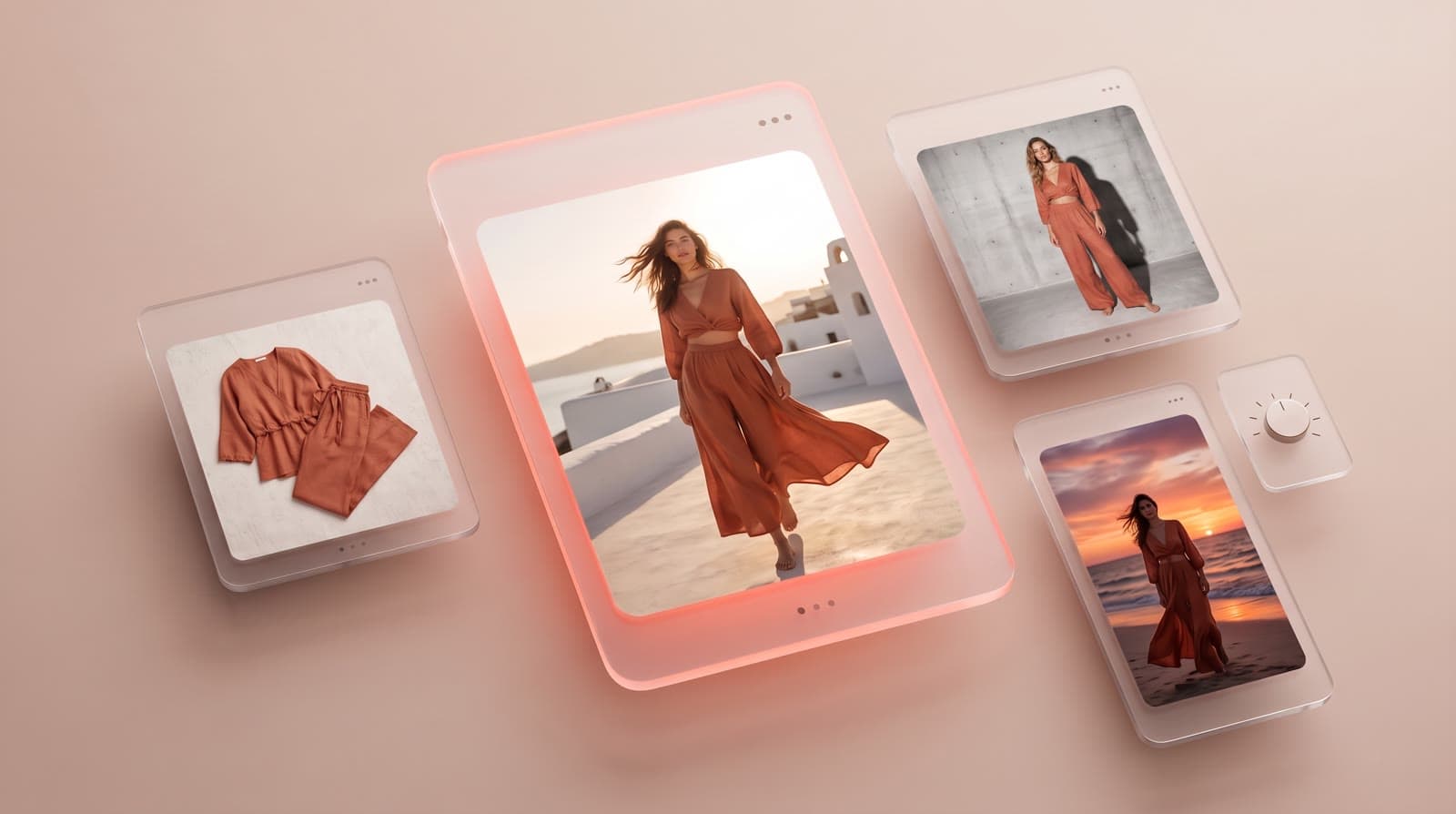
An AI fashion campaign uses your real garments, a realistic AI model and an editorial setting to produce launch visuals — without a location scout, a crew or a travel budget. This guide shows how clothing brands create campaign and editorial photos with AI: the creative brief, the choice of scenes and light, how to keep the garment accurate, and where to use the images.
Campaign, editorial, catalog: what is the difference?
| Catalog | Editorial | Campaign | |
|---|---|---|---|
| Goal | Sell each product | Tell the story of a collection | Launch and promote |
| Setting | Neutral background | Scenes that fit the collection | A strong, recognizable concept |
| Where it is used | Product pages, marketplaces | Lookbook, homepage, press | Ads, social media, banners, newsletters |
| What changes with AI | The model and the framing | The scene and the light | The concept, the scene and the format |
All three start from the same garment photos. That is the main gain of an AI fashion studio: one input, every use.
Step 1: write a one-page creative brief
- The concept in one sentence: "Linen collection, slow summer in a Mediterranean village".
- The model: age, look, attitude. Lock one face for the whole campaign with Identity Lock.
- The scenes: 3 to 5 settings maximum, so the campaign feels like one story.
- The light: golden hour, soft overcast, hard studio flash — choose one and keep it.
- The hero pieces: the 5 to 10 products the campaign must sell.
Step 2: choose scenes and light
Start from ready-made editorial scenes for clothing, shoes, bags, glasses and jewelry, or describe your own setting in AI photo scenes. Then adjust:
- Light: change the direction, intensity and color temperature with AI relighting, so every image matches.
- Pose and angle: vary them with the pose generator and camera angles while keeping the model and setting fixed.
- Accessories: style complete looks with jewelry editorial visuals.
Step 3: keep the garment real
A campaign can be bold, but the product cannot change. Before you publish, check every image:
- logos and prints are in the right place and at the right scale;
- the fabric keeps its texture and sheen;
- the color matches the real colorway;
- the length and fit look like the real garment.
The method for testing fidelity on your hardest pieces is in AI photoshoot for clothing brands.
Step 4: add motion
Campaigns perform better with video. Turn your best visuals into a runway video, a 360° view or a short clip with the AI video studio for social media and ads.
Where to use AI campaign images
- Ads on Meta, TikTok and Google: test several scenes for the same product.
- Homepage and collection banners.
- Social media: launch posts, carousels, stories.
- Newsletters and drop announcements.
- Buyers and press: alongside your AI lookbook.
Before running ads, check the transparency rules that apply to you: see AI-generated images in e-commerce and the law.
What it costs
On ClothesLook, a virtual try-on costs 5 credits — about $0.40 on the Hobby plan ($12/month for 150 credits). A campaign of 20 to 30 visuals with retries costs a few dollars to a few tens of dollars, versus a location shoot with travel, crew and models. See fashion photoshoot cost vs AI.
Go further
- AI lookbook generator: create a collection lookbook with AI
- AI photoshoot for clothing brands: shot list and garment fidelity
- AI fashion model prompt guide
Ready for your next launch? Try ClothesLook on your hero pieces — 10 free credits, no credit card required. See plans.
Frequently asked questions
Yes. An AI fashion studio places your real garments on a realistic model in an editorial setting — a street, a beach, an interior, a studio set — from your product photos. Brands use it for launch visuals, ads, social media and homepage banners, and often keep a real shoot for a flagship campaign.
Catalog photos show the product clearly on a neutral background to sell it. Editorial photos sell the mood: a setting, a light, a story around the collection. They come from the same garment photos, only the scene and the art direction change.
Write a short creative brief and reuse it for every image: one model locked across the campaign, a small set of scenes, a consistent light and color grade. Then check every image against the real garment before publishing.
Rules depend on the country and the use. In the EU, the AI Act introduces transparency obligations for some AI-generated content. Read our guide on AI-generated images in e-commerce and the law before running ads.