ClothesLook
AI Photoshoot for Clothing Brands: Shot List, Inputs and How to Keep the Garment Real (2026)
How a clothing brand runs an AI photoshoot for a whole catalog: the shot list per SKU, the input photos that work, how to test garment fidelity, and how to roll it out.
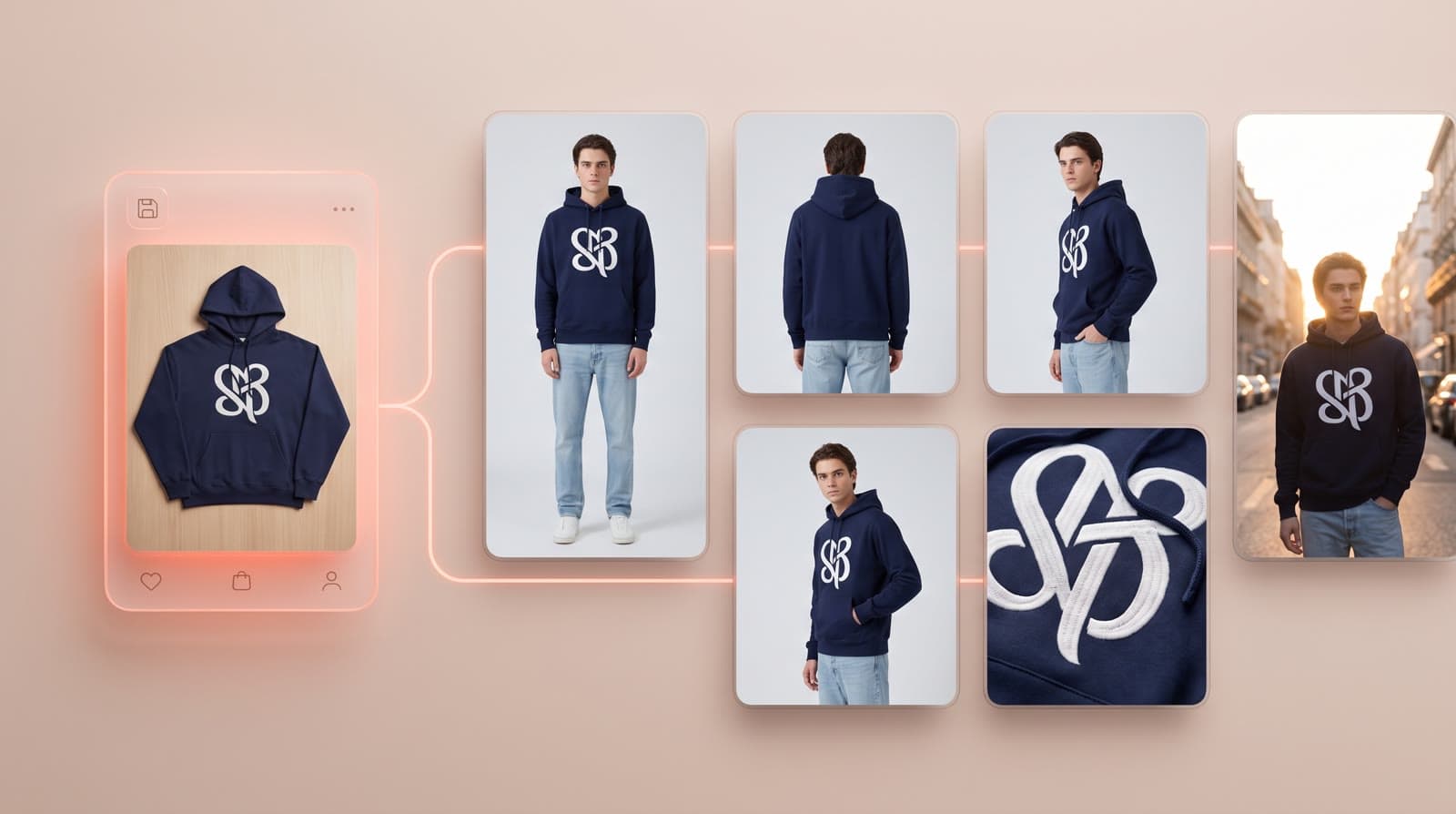
An AI photoshoot for a clothing brand is not about one pretty picture: it is about producing consistent, accurate on-model photos for every product, every colorway and every drop. This guide is the production playbook: the shot list per SKU, the input photos that work, how to test garment fidelity before you scale, and how to roll it out across your catalog.
When an AI photoshoot makes sense for a brand
- Large or fast-moving catalogs: new drops, restocks and colorways every month.
- Marketplaces and product pages that need the same framing for every SKU.
- Several audiences: different ages, skin tones, body sizes or a hijab style, without booking a model for each.
- Testing before producing: showing samples on-model before a collection is ordered in bulk.
A real shoot still makes sense for a flagship campaign with a known face, or for complex choreography. Many brands combine both — see AI models vs real models.
The shot list per product
Define it once and apply it to every SKU so your catalog stays consistent:
| Shot | Purpose | How to get it with AI |
|---|---|---|
| Front, full body | Main product image | Virtual try-on on your locked model |
| Back | Show the back, print or cut | Back input photo + camera angles |
| Three-quarter or side | Show volume and fit | Camera angles or poses |
| Detail / close-up | Fabric, logo, stitching | Close-up framing from the same visual |
| Lifestyle | Social media, ads, homepage | Editorial scenes |
| Motion | Product page and social media | Runway video or 360° view |
The input photos that work
- One garment per photo, fully in frame, not cropped.
- Even, soft light: no hard shadows hiding the texture.
- The true colorway: correct white balance, no filter.
- Flat lay, hanger, mannequin or packshot all work — see from flat lay to on-model.
- A back or detail photo whenever the back, a print or a logo matters.
Test garment fidelity before you scale
Do not start with your easiest T-shirt. Pick the 5 hardest pieces in your catalog and check each result against the real product:
- Logos and text: position, size and spelling.
- Prints and patterns: scale, alignment and repeat.
- Fabric: texture, sheen, transparency.
- Construction: stitching, buttons, zips, pockets.
- Length and fit: the hem and sleeves fall where they do on the real garment.
If these 5 pieces pass, the rest of the catalog will too.
Roll it out across the catalog
- Lock your brand model(s) with Identity Lock, so the same face appears on every product page.
- Fix one setting and light for catalog images, and a few scenes for lifestyle images.
- Run the shot list in batch with Catalog Studio and publish to Shopify.
- Review before publishing: one person checks fidelity on each SKU.
- Reuse for every new drop: same model, same setting, so new products match the old ones.
What it costs
On ClothesLook, a virtual try-on costs 5 credits — about $0.40 on the Hobby plan ($12/month for 150 credits). A full shot list of 4 to 6 visuals per product costs a few dollars, versus a day of studio, photographer and models for a traditional shoot. The full breakdown is in fashion photoshoot cost vs AI.
Go further
- AI lookbook generator: create a collection lookbook with AI
- Pro fashion photos on a small budget
- The 6 best AI fashion model generators
- AI fashion campaign and editorial photos
Start with your hardest garment. Try ClothesLook — 10 free credits, no credit card required. See plans.
Frequently asked questions
For most product page, marketplace and social media visuals, yes: an AI studio generates on-model photos from your garment photos. Brands often keep a real shoot for a flagship campaign and use AI for the rest of the catalog, new colorways and restocks.
One clean photo per garment: flat lay, hanger, mannequin or an existing packshot, with even light, the true color and the whole garment in frame. Add a back or detail photo for pieces where the back or a print matters.
Test on your hardest pieces first: a large logo, a complex print, a transparent or shiny fabric. Compare each result with the real product (logo, print, stitching, texture, length and fit) before you scale to the whole catalog.
On ClothesLook, a virtual try-on costs 5 credits, about $0.40 on the Hobby plan ($12/month for 150 credits). A full shot list of 4 to 6 visuals per product costs a few dollars. 10 free credits to test, no credit card.