
How to Turn a Flat-Lay Into an On-Model Photo With AI (2026)
How do you go from a flat-lay (clothing laid flat) to an on-model photo with no shoot? The step-by-step guide to generating on-model visuals with AI.
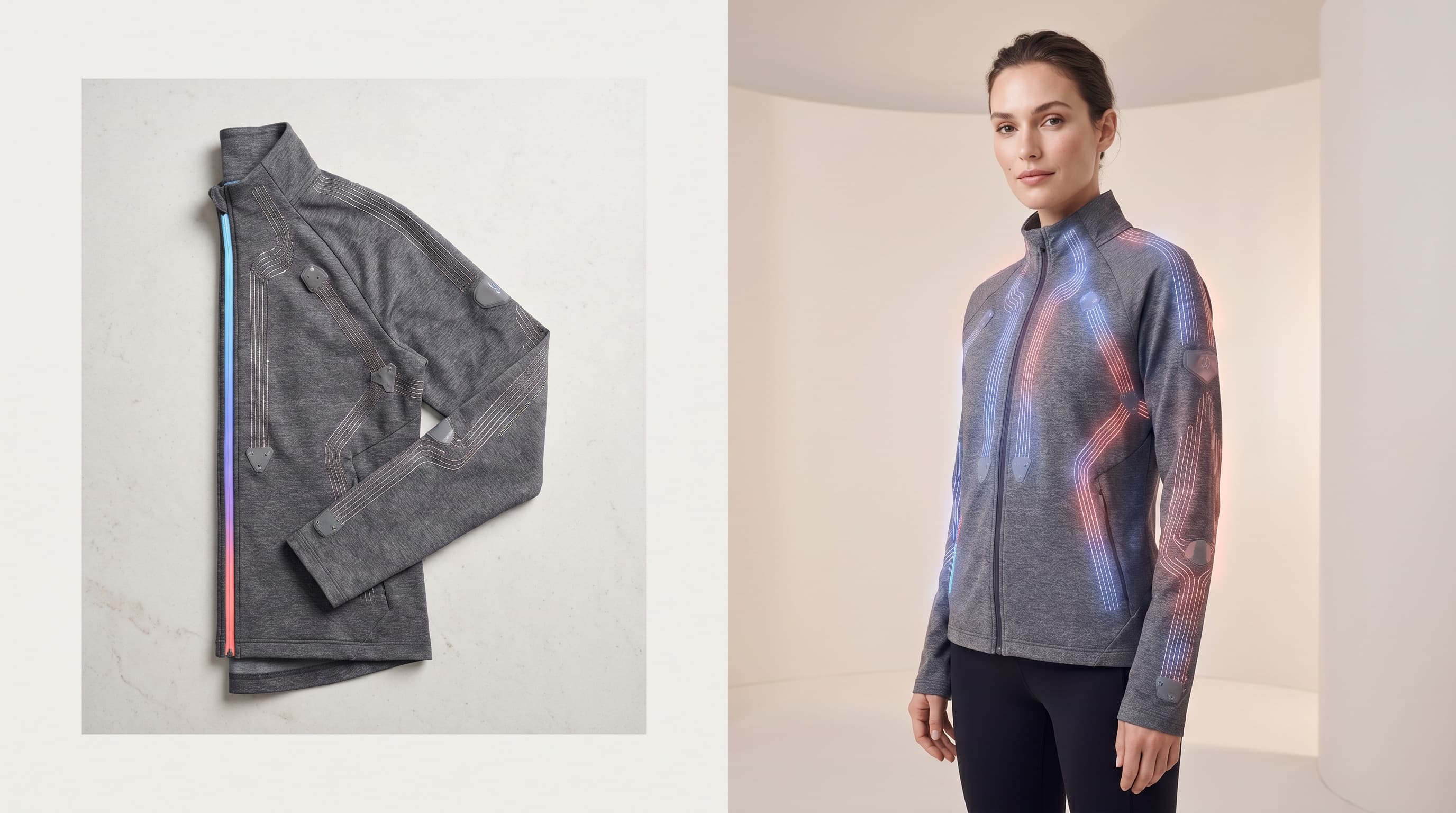
To turn a flat-lay (clothing laid flat) into an on-model photo without a shoot, simply upload the image into an AI virtual try-on tool, choose a generated model, and run the generation: the AI dresses the model in your garment while respecting drape, folds and shadows. The on-model visual is ready in minutes, exportable in high resolution.
This guide explains why on-model visuals convert better than flat-lays, how to prepare your source photo, and the step-by-step process to get a studio-grade result.
Why move from flat-lay to on-model?
A flat-lay is quick to produce, but it leaves the buyer guessing how the garment actually looks worn. An on-model photo shows the cut, length and drape on a body — exactly what a customer needs to picture themselves in it.
The impact on sales is concrete:
- product pages with an on-model visual convert better than flat-lays alone;
- they reduce uncertainty, and with it the "it doesn't hang the way I expected" returns;
- they strengthen the brand's perceived quality.
Historically, getting an on-model visual required a shoot. AI removes that constraint.
Which flat-lay photo should you use?
The quality of the on-model result depends directly on the source photo. Aim for an image that is:
| Criterion | Prefer | Avoid |
|---|---|---|
| Framing | Front view, full garment | Angles, cropped garment |
| Light | Even lighting, no glare | Hard shadows, direct flash |
| Background | Neutral, plain | Cluttered, patterned |
| Garment | Unfolded, ironed | Stray wrinkles, visible tags |
| Color | True to life | Under/over-exposed |
A simple flat-lay shot on a smartphone over a white sheet, well lit, is more than enough.
How to turn a flat-lay into an on-model photo (steps)
- Upload your flat-lay. Add the photo of the garment laid flat into the studio.
- Choose the model. Pick a generated model matching the profile you want (body shape, skin tone, pose) or reuse a locked reference model for consistency.
- Run the generation. The AI dresses the model in your garment, recomposing the folds, shadows and natural drape of the material.
- Refine if needed. Adjust the pose, background or lighting, then generate variants (colors, markets).
- Export in high resolution. Download the visual in 4K and publish it on your product page, catalog or social media.
The whole process takes a few minutes per product, versus several days for a traditional shoot.
Best practices for a professional result
- Lock your model (Identity Lock) so the whole catalog shares the same face, like a real shoot.
- Generate multiple angles: front, three-quarter, back — for a complete product page.
- Match the model to your market: a face and body shape close to your customers boosts identification and conversion.
- Combine with video: once the on-model visual is generated, animate it into a 360° video for social (see our guide on runway and 360° video).
Flat-lay, ghost mannequin, on-model: which to choose?
Three renders coexist, and AI lets you switch between them with no reshoot:
- the flat-lay: useful as a complement, to show flat detail;
- the ghost mannequin effect: the garment keeps its 3D shape with no person, ideal for a clean white background — detailed in our article on the ghost mannequin effect;
- the on-model render: the most immersive, the one customers project themselves into.
The best product page often combines all three.
In summary
Turning a flat-lay into an on-model photo no longer requires a shoot: upload the flat-lay, choose an AI model, generate, export. The on-model visual raises conversion and reduces returns, at a far lower cost and lead time than a studio.
Ready to try? Explore ClothesLook virtual try-on or read our guide What Is Virtual Try-On? first.
Frequently asked questions
Yes. With AI virtual try-on, you upload the flat-lay photo of your garment, choose a generated model, and the AI dresses the model in the garment while respecting drape, folds and shadows. No studio or shoot is needed.