 ClothesLook
AI eyewear photography: your frames in editorial scenes
Upload 3 views of your frame, pick a scene among 41 photo backdrops and 24 videos, and get an editorial visual of your optical glasses or sunglasses.
Included in the Seller, Brand and Studio plansSee pricing
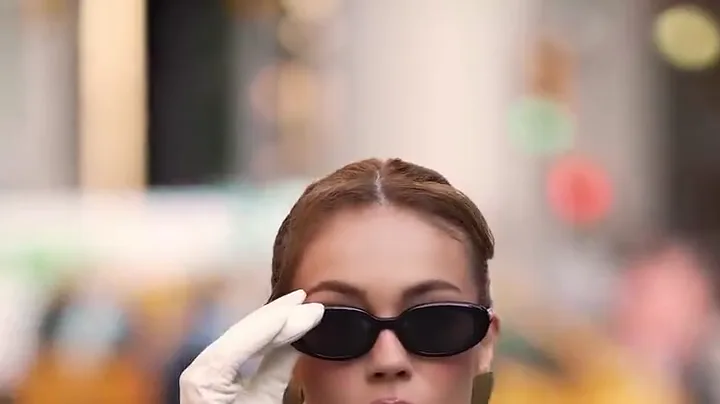
How do you photograph glasses with AI?
You upload three views of the frame (front, three-quarter, profile), specify optical glasses or sunglasses, then choose a scene: the AI generates a photo or a video of the glasses worn or placed in that setting.
How it works
Upload your frame
Add the front, three-quarter and profile views, and specify optical glasses or sunglasses.
Choose the scene
Pick a photo or video scene, or upload your own backdrop.
Generate
Get your editorial visual, as a photo up to 4K or a video up to 1080p.
A frame is judged when worn: on a face, in the city, in the sun. Shooting every model and every color in context takes models, settings and many takes.
Editorial Eyewear places your glasses, worn or placed, in 41 photo scenes and 24 video scenes. You upload 3 views of the frame — front, three-quarter and profile — and specify optical glasses or sunglasses.
Eyewear photoshoot vs ClothesLook Editorial Eyewear
| Criterion | Eyewear photoshoot | ClothesLook Editorial Eyewear |
|---|---|---|
| Settings | to scout and book | 41 photo scenes and 24 videos |
| Models | casting and session | AI models |
| Optical and sun | two sessions | both, in the same tool |
| Your own settings | on-site scouting | upload your scene |
Scenes for eyewear
41 photo scenes and 24 video scenes: portraits, street, seaside, café, studio…
3 views of the frame
Front, three-quarter and profile: the AI relies on the real shape of your glasses.
Optical or sun
Stage your optical glasses as well as your sunglasses.
Your own backdrops
Upload your own scene, as a photo or a video of up to 10 s, and place your glasses in it.
Who is it for, and when?
- Showcase every frame in a collection worn on a face.
- Create sunglasses videos for social media.
- Illustrate your product pages with photos in context.
- Keep a consistent art direction across your eyewear catalog.
Who is it built for?
Eyewear brands
Showcase every frame and every color worn, in an editorial setting.
Online opticians
Complete your product pages with photos of glasses being worn.
Sunglasses brands
Create your seasonal visuals without waiting for the sun.
Social media teams
Post videos of worn frames at the pace of your collections.
Frequently asked questions
41 photo scenes and 24 video scenes.
3 views: front, three-quarter and profile.
Yes, for optical glasses as well as sunglasses.
Editorial Eyewear is included in the Seller, Brand and Studio plans, for photos and videos.
Videos are generated in 480p, 720p or 1080p.
Yes. With “Add my scene”, you upload your own backdrop, as a photo or a video of up to 10 seconds, then place your glasses in it.
Guides & resources
Your next catalogue shoot starts here.
Launch it without a studio, without an agency, without post-production.